
Skip to the main content.
Panzura-Icon-FullColor-RGB@0.75x

Panzura

Our enterprise data success framework allows enterprises to build extraordinary hybrid cloud file and data systems.

architecture-icon

Platforms

Complementary file and data platforms that deliver complete visibility, control, resilience, and immediacy to organizations worldwide.

Layer_1-1

Resources

Find insights, news, whitepapers, webinars, and solutions in our resource center.

Layer_1-2

Company

We bring command and control, resiliency, and immediacy to the world’s unstructured data. We make it visible, safeguard it against damage, and deliver it instantly to people, workloads, and processes, no matter where they are.

13 min read

Your AI Reaches Whatever Your Permissions Allow, So Fix the Permissions

Your AI Reaches Whatever Your Permissions Allow, So Fix the Permissions

Table of Contents

Your AI Reaches Whatever Your Permissions Allow, So Fix the Permissions
20:59

How Panzura Nexus Holds Microsoft 365 Copilot and AI Agents to Your File Permissions, and How Panzura Symphony and CloudFS Shrink What Those Permissions Allow

Key Takeaways:

  • AI assistants read everything a user’s permissions allow, and most file estates carry years of stale, over-permissioned access. The first job is to shrink what any account can reach. Panzura Symphony finds and corrects broken permissions on the storage you run today, and Panzura CloudFS enforces the result for every client.
  • Panzura Nexus uses the file permissions as the only policy. It runs every Microsoft 365 Copilot query as the signed-in user, excludes anything that person cannot open, cites every answer to its source, and is read-only, so there is no second AI policy to maintain and no way for AI to change your files.
  • Panzura Nexus is event-driven, so new, changed, deleted, and restored files, and any removed access, are reflected in the next question in near real-time, not a nightly crawl. After an incident, AI answers from the recovered files under the current permissions.

An AI assistant covers more ground in a minute than a person does in a week. Point Microsoft 365 Copilot at a file platform and it will read everything the user’s permissions allow, including the folders that haven't been opened since the project closed.

Security teams call the problem oversharing. In plain terms, it is the gap between what people are supposed to be able to open and what they can open, and it has often been accumulating for years. Before AI, the gap mattered mostly when an over-permissioned user was looking. An assistant goes looking on every query.

The cost shows up before deployment. In a Gartner survey of IT leaders, 40% had delayed their Copilot rollout by three months or more because of oversharing, and 64% said governance and security risks demanded significant time and resources. It shows up after deployment too. In a recent ShareGate survey of IT and security leaders, 29% said AI tools had already surfaced sensitive data they should not have reached.

The first two posts in this Cyber Resilience series asked how much work you would redo after an incident and how you catch a stolen login. This is the third and final post in the series, and it asks the question that AI makes urgent: what data and files can your AI reach, who decided, and what happens when the answer changes?

The reach you have now

File permissions are the arithmetic of a career. Every project adds access, and reorganizations add even more. Almost nothing removes them. After a decade of projects, departures, and migrations, a file estate can hold hundreds of thousands of files that a single account can reach.

The mechanism is usually broken inheritance. For example, a folder that was shared for a project a few years ago, with permissions that no longer match its parent and were never reviewed. Permissions change daily. Access reviews happen quarterly, if at all. The gap between those two facts is most of the exposure.

The numbers are not abstract. In ShareGate’s report, 38% of organizations said they had left former employees or guests with access they should have lost in the past year, and 26% said sensitive content had reached the wrong people. Only 35% found permission problems through proactive monitoring. The rest relied on quarterly audits or user complaints. And in Varonis’s 2025 State of Data Security report, 99% of organizations analyzed had sensitive data exposed to AI tools through misconfigurations and permissive access controls.

This is the blast radius the second post in this series described for a compromised account. The difference is scale. A person with a stolen login has to know where to look. An assistant does not. It reads what the permissions allow and answers from all of it. Panzura’s Access Governance use case covers how to make permissions correct, current, and enforced everywhere.

One set of permissions, decided at query time

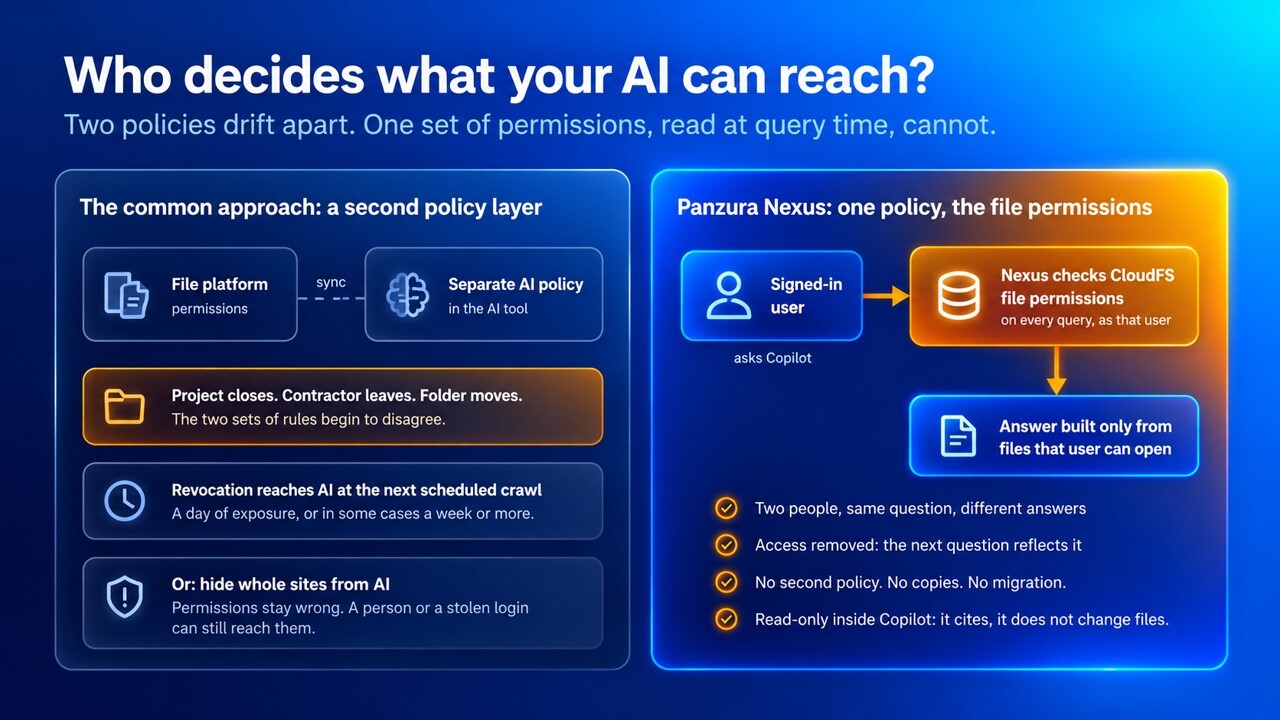
The common answer to AI oversharing is a second policy layer. That typically means a set of rules about which files AI may reach, maintained in the AI tool or a governance product, separate from the file platform. It works initially, but then a project closes, a contractor leaves, a folder is moved, and the two sets of rules begin to disagree. A revocation that reaches the file platform today and the AI layer at the next scheduled crawl is a day of exposure, or in some cases a week or more.

Some platforms address this by restricting whole sites or shares from AI altogether, which protects the data by making it useless to the assistant. Others rebuild permissions at index time, so what AI enforces is a snapshot of the access list as it stood when the crawl ran.

Image 1. Who decides what your AI can reach?

pan-ai-access-before-after

Panzura Nexus uses the file permissions as the only policy. It makes Panzura CloudFS file data askable in Microsoft 365 Copilot with no secondary copies of your files, no migration, and no redesign of your permissions. Files stay where they are. Nexus runs every query live as the signed-in user, against your existing Microsoft Entra ID and Active Directory security model, down to the file level. If a user cannot open a file in the file system, then it does not exist for their search, and moreover, it is excluded from the answer at retrieval time. Two people can ask the identical question and receive different answers, each built only from what that person could have opened anyway.

Every answer carries citations that link to the source document, down to the page, paragraph, or log row, so the person can read what the assistant reads. And the retrieval engine inside Copilot is read-only. It reads, cites, and summarizes. It does not write, approve, send, delete, or change anything in your file platform.

Changes travel the same way. File and permission changes propagate to Copilot within minutes, not on a nightly crawl, and when a document is deleted or a person’s access is removed, the next question reflects it. Nobody gets an answer built from a file they could open yesterday but cannot open today. There is no second policy to maintain and nothing to reconcile.

 Table 1. Separate AI Policy vs. File Permissions Enforced at Query Time  

Control
What to establish with each vendor
Panzura Nexus
Policy source
Whether AI access is governed by the file permissions or by a separate AI policy
The file permissions themselves; no second policy
When access is decided
At query time, or from a permission snapshot taken at index time
At the moment of each query
Revocation
How long a removed permission takes to reach AI results
The next question reflects it; changes propagate within minutes, not on a nightly crawl
Data movement
Whether files must be copied to a data lake or re-permissioned
None; no secondary copies, and files stay on CloudFS
Scope of the answer
Whether AI can reach a file the user could not open directly
No, the same permissions govern both paths
What AI can do to the files
Whether the AI connection can write, delete, or change files, or only read them
Read-only inside Copilot; it reads and cites, it does not write, approve, send, or change anything

← Swipe to see more →


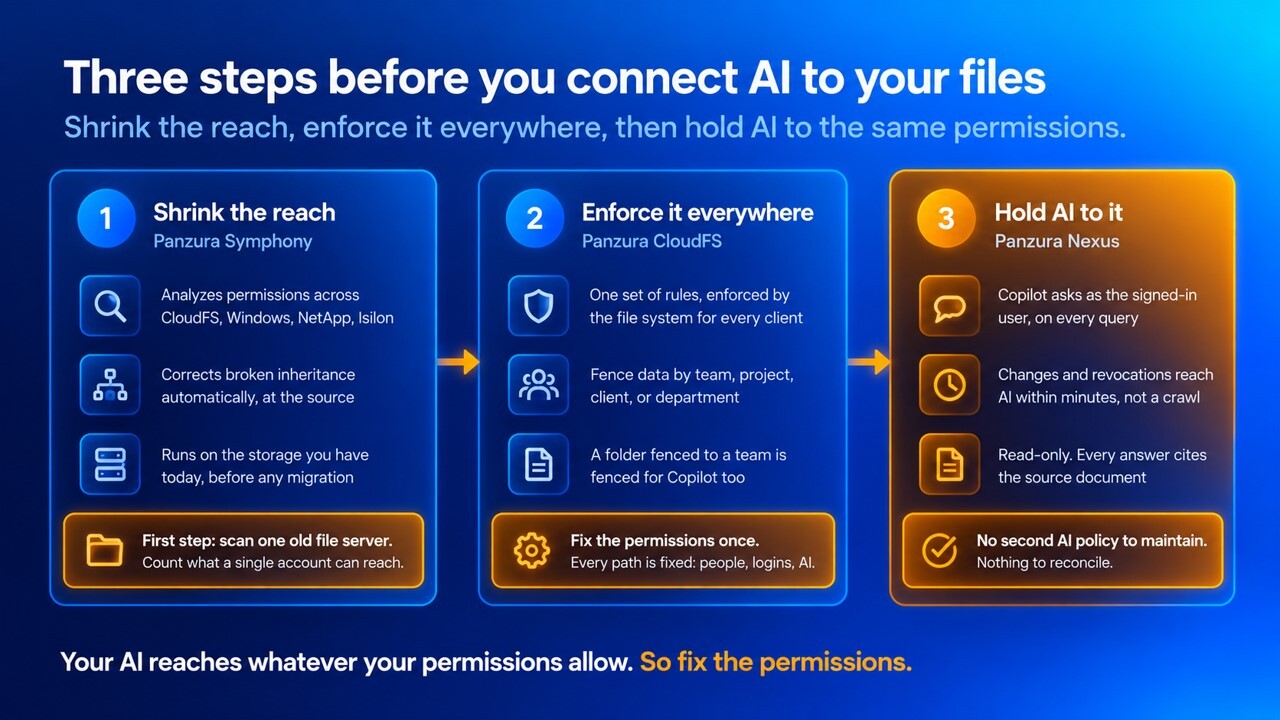
Shrink the reach before you connect AI

Enforcing permissions perfectly only applies the wrong answer consistently. If the permissions themselves are wrong, applying AI to them does not help. The reach must shrink first, and it has to shrink on the storage you run today, not after a platform decision.

Running a Panzura Symphony analyzes access control lists (ACLs) across CloudFS and third-party estates alike, including Windows file servers, NetApp, and Isilon. It surfaces anomalous findings, corrects broken inheritance automatically during policy execution, and repairs the problem at its source. It is a separate platform by design, so the clean-up can start now, before a single file moves.

Image 2. Three steps before you connect AI to your files

pan-shrink-reach-ai

A practical first step is to run Panzura Symphony against one file server with a long history and count what a single account can reach. That figure usually changes the conversation with your CISO fundamentally. For more on how sprawl accumulates and what it costs, see Permission Sprawl Is Eating Your Budget and Killing Your AI Initiatives.

Panzura CloudFS enforces the result at the protocol layer, across SMB, NFS, and S3, so one set of rules governs every client. The same mechanism ring-fences data by function as well as geography. For example, a deal team, a client, a project, a department. A folder fenced to a project team is fenced for Microsoft 365 Copilot too, because Panzura Nexus reads the same permissions.

The contrast is with approaches that govern AI reach from inside the AI tool. Restricting a site from search hides it from the assistant but leaves the underlying permissions as they were, so a user, a stolen login, or a different tool can still reach it. Fixing the permissions fixes every path.

 Table 2. Restricting AI from Inside the Tool vs. Fixing the Permissions at the Source  

Control
What to establish with each vendor
Panzura
Where remediation happens
In the AI tool, or at the file permissions themselves
At the permissions, via Symphony, so every path is fixed
Storage covered
Only the vendor’s own platform, or the estate you have today
CloudFS and third-party estates, including Windows, NetApp, and Isilon
Broken inheritance
Reported, or corrected
Corrected automatically during policy execution
Enforcement
At the client, or at the protocol layer for every client
CloudFS enforces at the protocol layer across SMB, NFS, and S3
Segmentation
By location only, or by function
By geography and by function: team, project, client, department

← Swipe to see more →

Keep AI on the live files

Permissions are half of what AI inherits. The other half is the content, and it changes constantly. An AI assistant working from last night’s index answers from last night’s files.

Panzura Nexus is event-driven. When a file is written or changed in CloudFS, that event is what makes the document searchable within minutes. There is no scheduled re-index to wait for, and no sync is required. For instance, the RFI response that came in this morning is askable this morning. The same applies in reverse. When a document is deleted or a user’s access is removed, the next question reflects the changes. No scheduled crawl of the data set is required.

That matters most after the types of incidents the first two posts in this series described. When CloudFS disables a compromised account, that account’s next question in Copilot reflects it. When a folder is restored in place from a named snapshot, the restored files are written files, and the same event that makes any new file available makes them searchable. AI answers from the recovered state, not from what the attacker left behind. And because Panzura Nexus only answers from what the record contains, every answer is built from and cited to retrieved documents, so the reader can easily verify.

Search and activity audits serve the response team as well. Panzura CloudFS (with integrated Panzura Data Services) shows who, or what, touched a file and when. AI-assisted search can help authorized responders find affected files during an incident, subject to the same permissions as everyone else, with every answer citing the documents it was built from. The record itself stays with CloudFS.

Table 3. Incident Scenarios: What the File Platform Must Do and How Panzura Responds

Scenario
What the platform must do
Panzura response
Contractor leaves the project
Remove their reach from the files and from AI at the same time
Permission removed in CloudFS; their next question in Copilot no longer sees the files
Stolen login queries Copilot
Give AI no more reach than the file share gives
Panzura Nexus runs every query as the signed-in user; account disabled by CloudFS, and the next question reflects it
Folder restored after an incident
Make AI answer from the recovered content
Restored files are written files; the write event makes them searchable within minutes
Team folder fenced to five people
Keep AI inside the fence
CloudFS ring-fences by function; Nexus reads the same permissions*
External AI agent or script queries project files
Operate under a defined identity with authorized content only
Panzura Nexus MCP Server (now in beta) lets agents and scripts outside Copilot query the same data while honoring the same identity, permissions, and citations; it searches as the signed-in user and makes no copy of the files

← Swipe to see more →

*NOTE: CloudFS can ring-fence a folder: restrict it to a named set of people, a team, a project or a client, so that nothing in it is visible to anyone outside that set. Nexus reads the same permissions, so an AI assistant answering a question sees exactly what the person asking is allowed to see, and nothing from inside a fence they are not part of.

Build AI access confidence

AI access confidence is knowing, before you connect an assistant or an agent, what it can reach, who decided, how fast a change takes effect, and what the record will show afterward. It depends on more than the file platform. Identity, the AI platform’s own controls, and the agent’s identity model all matter. What the file platform adds is the one policy every path shares, which is the permissions on the files.

Analysts have started to treat governed AI access as part of the storage conversation. Panzura is recognized in the 2026 Gartner® Market Guide for Hybrid Cloud Storage, and in our view the governed AI data access in CloudFS, delivered through Panzura Nexus, is part of what that recognition reflects. Panzura is also a Representative Vendor in the 2026 Gartner Market Guide for Cyberstorage. Frost & Sullivan cited AI-readiness among the technical advantages of CloudFS in its Frost Radar for hybrid cloud storage.

Agentic AI raises the requirement again. An agent should operate under a defined identity, use only authorized content, and leave an auditable record of what it did. For teams building with agents outside Copilot, such as custom enterprise agents or automated scripts, the Panzura Nexus MCP Server, now in beta, exposes the same retrieval layer through an open protocol. What stays the same between Microsoft 365 Copilot and MCP is what matters in that it searches as a signed-in user, it cites its sources, and it does not make a copy of your files. Inside Copilot, the retrieval engine is read-only. CloudFS and Panzura Nexus provide the governed file foundation. The agent’s identity model, tool permissions, and audit controls still must be validated with the AI platform and the workflow in use.

Evaluation checklist

Every file platform now claims to be AI-ready. These questions establish what is behind the claim. Put them to every vendor on your list, including us.

  1. What governs what our AI can reach? The file permissions, or a separate AI policy? If both, which wins when they disagree?
  2. Is access decided at query time, as the signed-in user, or from a permission snapshot taken when the index was built?
  3. When a permission is removed, how long before the file stops appearing in AI results?
  4. Do files have to be copied to a data lake or re-permissioned before AI can use them?
  5. Can we find and fix over-permissioned folders on the storage we run today, before migration?
  6. Is broken inheritance reported, or corrected?
  7. Can we fence data by team, project, or client, and does AI respect the fence?
  8. How quickly does new or changed file content reach AI, and is that event-driven or scheduled?
  9. After a file or folder is restored, when does AI answer from the recovered version?
  10. If a compromised account is disabled, how quickly is it cut off from AI?
  11. Can an AI agent act on our file data, and under which identity, permission model, and audit controls?
  12. Where is the record of what users and AI accessed, and who can consume it?

Then run the exercise. Give a test user access to one project folder and no others, ask Microsoft 365 Copilot about the estate, and record what comes back. Have a second user with wider access ask the same question and compare the two answers. Remove the access and ask again. Note how long the change took. Restore a folder from a snapshot and ask about its contents. Check that every answer cites the document it came from. Do the same with an agent, where you have an agent path in place.

Single-site firms can ask the same questions. Panzura Express is CloudFS for one location, with Panzura Nexus included.

MCP interfaces are under development across the Panzura portfolio with early release options available now. Secure agent access and conversational interaction through Microsoft 365 Copilot, and read-write S3 to any framework your teams build on, are available today without MCP. You can register your interest in the Panzura Nexus MCP beta.

Learn more about Cyber Resilience with Panzura. This is the final post in the Cyber Resilience blog series. The series ends with a live webinar, “Three Questions to Ask Every File Platform About Cyber Resilience in the AI Era,” with Darrin Chapman and Raul Sanchez.


Frequently Asked Questions (FAQs)

  • How does Panzura Nexus keep Microsoft 365 Copilot from surfacing files a user is not allowed to see?

    Panzura Nexus uses the file permissions as the only access policy. Every Microsoft 365 Copilot query runs live as the signed-in user, against the organization’s existing Microsoft Entra ID and Active Directory security model, down to the file level. If a person cannot open a file in the file platform, it is excluded from the answer at retrieval time. Two people can ask the identical question and receive different answers, each built only from what that person could have opened anyway. There is no separate AI policy to maintain and no data lake to copy files into. Files stay on Panzura CloudFS, and the retrieval engine inside Copilot is read-only: it reads, cites, and summarizes, and does not write, delete, or change anything.  

  • How quickly does a removed permission or a deleted file stop appearing in Microsoft 365 Copilot answers with Panzura Nexus?

    Panzura Nexus is event-driven. When a file is written or changed in Panzura CloudFS, that event makes the document searchable in near real-time. There is no scheduled re-index to wait for, and no sync to run. The same applies in reverse. When a document is deleted or a user's access is removed, the next question reflects it. Nobody gets an answer built from a file they could open yesterday but cannot open today. This matters after a security incident. When CloudFS disables a compromised account, that account’s next question in Copilot reflects it, and when a folder is restored from a snapshot, the restored files become searchable the same way any newly written file does.

  • How do you fix over-permissioned folders before connecting AI to a file platform?

    Enforcing permissions perfectly only applies the wrong answer consistently, so the reach has to shrink first. Panzura Symphony analyzes access control lists (ACLs) across Panzura CloudFS and third-party storage, including Windows file servers, NetApp, and Isilon. It surfaces anomalous findings and corrects broken inheritance automatically, repairing the problem at its source rather than hiding folders from the AI tool. Because Symphony is a separate platform, the clean-up can start on the storage an organization runs today, before any migration. A practical first step is to run it against one file server with a long history and count what a single account can reach. Panzura CloudFS then enforces the corrected permissions for every client, and Panzura Nexus reads the same permissions for Microsoft 365 Copilot.

  • Can an AI agent read Panzura CloudFS files, and under what controls?

    Yes, through two paths. Inside Microsoft 365 Copilot, the Panzura Nexus retrieval engine answers questions as the signed-in user and is read-only. For agents and scripts outside Copilot, such as custom enterprise agents or automated workflows, the Panzura Nexus MCP Server exposes the same retrieval layer through an open protocol. What stays the same on both paths is what matters. The query runs as the signed-in user, every answer cites its source documents, and no copy of the files is mad. Panzura CloudFS and Panzura Nexus provide the governed file foundation. The agent’s own identity model, tool permissions, and audit controls still have to be validated with the AI platform and the workflow in use.

  • Does Panzura Nexus require copying files to a data lake or re-permissioning them for Microsoft 365 Copilot?

    No. Panzura Nexus makes Panzura CloudFS file data askable in Microsoft 365 Copilot with no secondary copies of the files, migration, or redesign of permissions. Files stay where they are on CloudFS, and the permissions already in the file platform are the permissions Panzura Nexus uses. That removes the main cost of most AI data projects, which is building and maintaining a second store with a second set of access rules that drifts from the first. It also means a file platform’s existing fences hold. A folder restricted to a project team, a client, or a department in CloudFS is restricted for Copilot too, because Panzura Nexus reads the same permissions on every query.

  • What questions should you ask a file platform vendor about AI access before buying?

    Start with who decides what AI can reach: the file permissions, or a separate AI policy, and which wins when they disagree. Ask whether access is decided at query time as the signed-in user, or from a permission snapshot taken when the index was built. Ask how long a removed permission takes to disappear from AI results, and whether files must be copied or re-permissioned first. Ask whether over-permissioned folders can be found and fixed on the storage you run today. Ask whether the AI connection can write or delete files, or only read them, and whether every answer cites its source. Then run a test: give one user a single folder, ask Microsoft 365 Copilot about the estate, remove the access, and ask again.

  • After a ransomware recovery, how do you make sure AI is answering from the restored files?

    Recovery has two audiences: the people who need to resume work, and the AI assistants working from the same files. With Panzura CloudFS, a file or folder is restored in place from a named snapshot, and unaffected work stays where it is. Because Panzura Nexus is event-driven, restored files are written files, and the same event that makes any new file searchable makes them searchable within minutes. AI answers from the recovered state, not from what the attacker left behind. When CloudFS disables a compromised account during the incident, that account’s next question in Microsoft 365 Copilot reflects it. Every answer cites the documents it was built from, so responders can verify what the assistant is working from.


About the author
David Barley
David Barley

David Barley is a Principal Solutions Architect at Panzura. He has over two decades of experience building HPC, AI, and large-scale data solutions for enterprises, startups, and government agencies.

Your AI Reaches Whatever Your Permissions Allow, So Fix the Permissions

Your AI Reaches Whatever Your Permissions Allow, So Fix the Permissions

How Panzura Nexus Holds Microsoft 365 Copilot and AI Agents to Your File Permissions, and How Panzura Symphony and CloudFS Shrink What Those...

Panzura Named as a Sample Vendor in the Gartner® Hype Cycle™ for Storage Technologies, 2026

Panzura Named as a Sample Vendor in the Gartner® Hype Cycle™ for Storage Technologies, 2026

Why Agentic AI Puts Unstructured File Data at the Center of Storage Strategy, and What to Ask of a File Platform

Procore and Panzura CloudFS: How the Project Platform and the File Layer Work Together

Procore and Panzura CloudFS: How the Project Platform and the File Layer Work Together

Procore Runs the Project. CloudFS Keeps Every File Behind It Current, Locked Across Offices, and Recoverable in Minutes, With No Connector and No...