

Skip to the main content.
Panzura-Icon-FullColor-RGB@0.75x

Panzura

Our enterprise data success framework allows enterprises to build extraordinary hybrid cloud file and data systems.

architecture-icon

Platforms

Complementary file and data platforms that deliver complete visibility, control, resilience, and immediacy to organizations worldwide.

Layer_1-1

Resources

Find insights, news, whitepapers, webinars, and solutions in our resource center.

Layer_1-2

Company

We bring command and control, resiliency, and immediacy to the world’s unstructured data. We make it visible, safeguard it against damage, and deliver it instantly to people, workloads, and processes, no matter where they are.

10 min read

Procore and Panzura CloudFS: How the Project Platform and the File Layer Work Together

Procore and Panzura CloudFS: How the Project Platform and the File Layer Work Together

Table of Contents

Procore and Panzura CloudFS: How the Project Platform and the File Layer Work Together
16:21

Procore Runs the Project. CloudFS Keeps Every File Behind It Current, Locked Across Offices, and Recoverable in Minutes, With No Connector and No Change to Procore.

Key Takeaways:

  • Procore runs the project. Panzura CloudFS runs the files behind it. Procore holds the published version everyone on the job sees, while the models, estimates, markups and scans that feed it are created and revised on file shares across offices. CloudFS keeps those in one authoritative data set, with no connector and no change to Procore.
  • The file layer is where projects go wrong and where attackers aim. An outdated version uploaded to Procore gets built in the field, and construction ransomware incidents have rose 44% year over year. Sync-and-share and hub-and-spoke designs leave version windows and central dependencies. CloudFS locks every file by default, decides locks node to node, and writes immutable data every 60 seconds at every site.
  • Panzura Nexus extends the same record to AI. Procore agents answer from the active project. Panzura Nexus makes the firm’s CloudFS files answerable in Microsoft 365 Copilot without moving them, with permissions checked at query time. The seven evaluation questions in Table 3 are the ones to put to any file platform, including Panzura.

Construction has settled where projects are run. Procore is the system of record for RFIs, submittals, published drawings, budgets, inspections and daily logs, and more than three million projects have run on it in more than 160 countries. What is far less settled is where the files behind those projects are created, revised, and kept. That question decides how fast a regional office can open a federated model and how a firm recovers from ransomware.

Panzura CloudFS works alongside Procore. This piece sets out what each system is responsible for, and why the design of the file layer matters more than most firms realize.

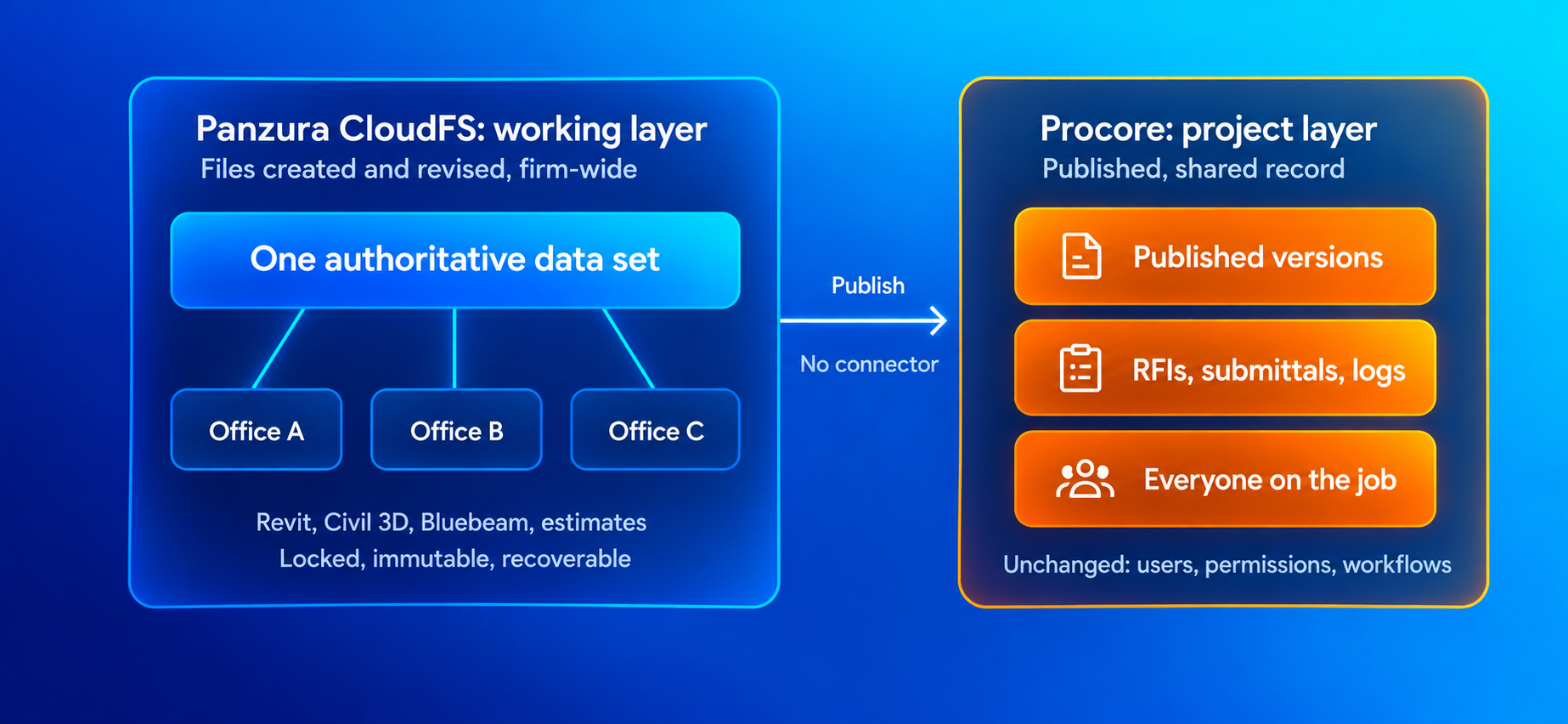
Image 1. How Procore and Panzura CloudFS work together

CloudFS to Procore Data FlowProcore and Panzura CloudFS: Two Layers, Two Jobs

Procore holds the published, shared version of a project, visible to everyone on the job across companies. Most of what gets published there starts somewhere else. That includes estimate workbooks and takeoffs, Revit, Navisworks and Civil 3D models Bluebeam markups, schedules, scans, shop drawings and fabrication files, which are all produced in desktop applications, on file shares, and often by teams in several offices. They go through many revisions before a version reaches Procore, and the firm's own record of them must last long after the job closes.

CloudFS is for that working layer. It presents standard Windows file shares to the applications people already use, while every file exists as one authoritative data set in the cloud object storage the firm chooses. CloudFS is not a Procore integration. There is no connector, plug-in or Procore configuration, and a firm’s Procore projects, users, permissions and workflows stay exactly as they are. The two systems meet at the moment of publishing, when a file saved in CloudFS is uploaded to Procore the same way it is today

Table 1. Procore and Panzura CloudFS: responsibilities in a construction firm

Attribute
Procore
Panzura CloudFS
Product category
Cloud construction management platform
Hybrid cloud file platform
Primary content
Published drawings, specs and models; RFIs, submittals, change events, daily logs
Working models and CAD files, estimates, bid files, markups, schedules, scans, closed-project archives
Who uses it
Everyone on the project, across companies
The firm's own staff, including people who never log in to Procore
How it is accessed
Browser and mobile app
Standard file shares and mapped drives
Role at the handoff
Receives and distributes each published version
Holds the source file each published version came from
Changes required to the other system
None
None; no connector or plug-in

← Swipe to see more →

Why the File Layer Is Where Projects Go Wrong

Procore distributes whatever it is given, faithfully and quickly. If the file uploaded is an outdated version from another office server, the field builds from it. The cost of that kind of error is well documented. A study by FMI and PlanGrid of nearly 600 construction leaders found that 48% of rework on U.S. jobsites traces back to miscommunication and poor project data, at an estimated $31.3 billion a year. The same research found that construction professionals spend 5.5 hours a week looking for project data and information.

The file layer is also where attackers aim. GuidePoint Security recorded 131 ransomware victims in the construction industry in the first quarter of 2026, a 44% increase year over year, moving the sector to fourth among the most affected industries. Drawings, bids, RFIs and change orders carry extortion value, and a stalled project triggers penalties quickly. Across industries, the Sophos State of Ransomware 2026 found that 56% of attacks succeeded in encrypting data and that average recovery cost reached $1.7 million, excluding any ransom. Only 16% of organizations recovered in less than a day.

For a firm running Procore, the question is which file platform design to choose.

Three Ways to Build a Multi-Office File Platform

Most platforms that promise a single source of truth across offices follow one of two designs, both described in the Panzura CloudFS overview.

In a sync-and-share design, a cloud content store is the master, and each desktop client or on-premises cache reconciles against it. File locking is typically enforced by the desktop application, so it covers users of that client rather than every route to the data. Connecting such a platform to Procore usually means syncing folders between the two on a schedule, which creates a synced duplicate of the project with its own size limits, timing, and conflicts to resolve.

In a hub-and-spoke design, data sits in the cloud, but changes and locks are coordinated through a central service or portal and then propagated to each site. Cross-site locking is often enabled folder-by-folder or by file type and may need to be licensed separately. The central service is where oversight happens and every site depends on it.

CloudFS takes an entirely different route. One authoritative data set resides in object storage, and every office works in it directly. Each CloudFS node holds the full file system metadata and communicates with every other node in a full mesh, so a lock taken in one office is honored in every other office without a central broker deciding. If a node fails, global high-availability (HA) moves lock management to another node so other sites keep working.

Table 2. Multi-office file platform architectures compared

Dimension
Sync-and-share
Hub-and-spoke
Panzura CloudFS
Source of truth
Cloud content store; endpoints reconcile against it
Cloud data set, propagated to each site
One authoritative data set in object storage, used directly by every site
Where locks are decided
Desktop client
Central cloud service or portal
Node to node, with no central broker
Locking scope
Users of the client
Often per folder or file type, sometimes licensed separately
Every file, by default, with no separate license
How project data reaches Procore
Scheduled folder sync into a synced duplicate
Manual upload from the propagated site data
Direct upload from the file share to which applications already save
Ransomware recovery
Version history and detection often in higher tiers
Snapshot schedules to tune; protection may be an add-on
Immutable data written every 60 seconds, built in
Pricing basis
Primarily per user
Capacity, with collaboration features often tiered
Capacity, with locking and immutability included

← Swipe to see more →

What the Architecture Means in Action

  • The published file is the current file: With one authoritative data set, anyone opening a file sees the most recent saved changes, wherever they were made. There is no second store of project data to keep in step with Procore, and every version published to Procore traces back to a single file.
  • Teams in different offices can work in the same files: CloudFS locks every file by default, in every folder, with no list of protected paths for IT to maintain. For applications that support it, byte-range locking allows multiple users to edit different parts of the same file at once, including Revit, AutoCAD, Civil 3D, Tekla, and MicroStation in supported configurations. Firms using Autodesk Cloud Worksharing for active Revit co-authoring can keep doing so, with CloudFS serving Civil 3D, Navisworks, estimates, and cross-office coordination files alongside it.
  • Large models open at local speed: Active files are cached at each site and only changed data travels across the network. A federated model or a 400-sheet drawing set opens from a regional office about as quickly as it does at headquarters, so people stop saving private versions to their desktops, which is where most version problems begin.
  • Recovery is measured in minutes: CloudFS writes changed data to object storage every 60 seconds as new immutable objects. Existing data is never overwritten, so ransomware cannot encrypt it in place, and a share can be returned to a clean point in time in minutes. This is how the file system works by default at every site, not a setting tuned against network load or a premium tier.
  • The project record stays with the firm: Specialty contractors and designers often work inside another company’s Procore account, with access that lasts as long as the account holder allows. CloudFS keeps the firm’s own record of what it designed, detailed, submitted and built, on immutable storage with retention set by policy, and CloudFS adds a full audit history of file activity.

CloudFS replaces a file server in every office with one global file system on the firm's chosen object storage. Licensing is based on capacity, with locking and immutability included, so adding project staff, partners or a new office does not add per-user cost.

AI That Reaches Beyond the Active Project

Procore AI agents give project teams cited answers across the specs, drawings, RFIs and submittals held in Procore, and help draft RFIs, submittal reviews and daily logs. Much of what a firm knows, though, sits outside any single active project. That includes how similar jobs were estimated, which details caused trouble before, and what a past closeout file says.

That institutional knowledge is contained in the file platform. Panzura Nexus makes CloudFS files answerable in Microsoft 365 Copilot without moving them. It takes in data as files change rather than on a nightly schedule, and checks permissions at the moment each question is asked. A saved change reaches Copilot in near real-time. and so does a revoked permission. AI depends on the fact that an answer is only as reliable as the file it came from.

Questions to Ask Any File Platform

The differences between designs are easiest to see in how each one answers a few direct questions.

Table 3. Evaluation questions for file platforms in Procore environments

Question
Why it matters
Panzura CloudFS
When someone in another office opens a file, are they guaranteed the latest saved version?
Sync and propagation delays leave windows where the wrong version can be opened or published
Yes, wherever the change was made
Is cross-office locking for every file by default?
Files outside configured folders or file types can still be overwritten
Every file, by default
Where are locks decided, and what happens if that component fails?
A central service is a dependency for every site
Node to node, with failover for lock management
Can people in two offices work in the same large model?
Whole-file locks keep co-authoring in one building
Yes, with byte-range locking for supported applications
Does it keep a second store of project data alongside Procore?
Two stores mean sync limits, delays and conflicts
No
What is the default recovery point, and is it included in the base license?
Best-case settings and add-on tiers are not the same as default protection
60 seconds, at every site, included
Does cost rise with headcount, and are collaboration features extra?
Construction headcount changes constantly
Capacity-based; locking and immutability included

← Swipe to see more →

Complementary by Design

Procore and CloudFS do not overlap and neither competes with the other. Procore runs the project and connects everyone on the project. CloudFS keeps every file behind the project current, fast to open, safe from overwrites and recoverable, from the first estimate to the archive a firm will still need a decade from now.

Start by reading the CloudFS and Procore “better together” brief.

Then, talk to a Panzura expert about where your file layer stands. The seven questions above are the ones you should evaluate with every vendor including Panzura. Bring your office count, your largest model, and your current recovery point, and we’ll walk through how CloudFS runs under Procore in your environment.

Procore is a trademark of Procore Technologies, Inc. Panzura CloudFS is an independent product. It is not a Procore integration, and Panzura is not affiliated with, endorsed by or sponsored by Procore. Other product names belong to their respective owners.


Frequently Asked Questions (FAQs)
  • Does Panzura CloudFS integrate with Procore?

    No, and it does not need to. Panzura CloudFS is not a Procore integration. There is no connector, plug-in or Procore configuration, and a firm’s Procore projects, users, permissions and workflows stay exactly as they are. The two systems are responsible for different layers. Procore holds the published, shared version of a project that everyone on the job sees. CloudFS holds the working files behind it: models, estimates, markups, schedules, scans and closed-project archives, presented as standard Windows file shares to the applications people already use. They meet at the moment of publishing, when a file saved in CloudFS is uploaded to Procore the same way it is today. Nothing changes on the Procore side.

  • If Procore already stores project documents, why does a construction firm need a file platform?

    Because most of what gets published to Procore is created and revised somewhere else first. Revit, Navisworks and Civil 3D models, estimate workbooks, Bluebeam markups, shop drawings and scans go through many revisions on desktop applications and file shares, often across several offices, before a version is published. If the file uploaded is an outdated version from another office server, Procore distributes it faithfully and the field builds from it. The firm also needs its own record of what it designed and built long after the job closes and after its access to another company’s Procore account ends. The file layer is where version problems start and where ransomware aims, so its design matters.

  • What is the difference between sync-and-share, hub-and-spoke and Panzura CloudFS for multi-office firms?

    In a sync-and-share design, a cloud content store is the master and each desktop client or cache reconciles against it, with locking enforced by the client rather than every route to the data. In a hub-and-spoke design, changes and locks pass through a central service that every site depends on, and cross-site locking is often enabled per folder or file type. CloudFS uses one authoritative data set in object storage that every office works in directly. Each node holds the full file platform metadata and talks to every other node in a full mesh, so a lock taken in one office is honored everywhere without a central broker, and lock management fails over if a node goes down.

  • Can teams in different offices work in the same Revit or Civil 3D model with Panzura CloudFS?

    Yes. Panzura CloudFS locks every file by default, in every folder, with no list of protected paths for IT to maintain. For applications that support it, byte-range locking lets several people edit different parts of the same file at once, including Revit, AutoCAD, Civil 3D, Tekla and MicroStation in supported configurations. Firms using Autodesk Cloud Worksharing for active Revit co-authoring can keep doing so, with CloudFS serving Civil 3D, Navisworks, estimates and cross-office coordination files alongside it. Active files are cached at each site and only changed data travels across the network, so a federated model or a 400-sheet drawing set opens from a regional office about as quickly as it does at headquarters.

  • How does CloudFS protect construction project files from ransomware?

    Panzura CloudFS writes changed data to object storage every 60 seconds as new immutable objects. Existing data is never overwritten, so ransomware cannot encrypt it in place, and a share can be returned to a clean point in time in minutes. This is how the file system works by default at every site, not a setting tuned against network load or a premium tier. It matters because construction ransomware incidents rose 44% year over year in the first quarter of 2026, drawings and bids carry extortion value, and a stalled project triggers penalties quickly. Panzura Data Services adds file activity auditing so responders can establish what was touched before a restore begins.

  • How does Panzura Nexus work with Procore’s AI?

    They answer different questions. Procore’s AI agents give project teams cited answers across the specs, drawings, RFIs and submittals held in Procore for an active project. Much of what a firm knows sits outside any single project: how similar jobs were estimated, which details caused trouble before, what a past closeout file says. Panzura Nexus makes CloudFS files answerable in Microsoft 365 Copilot without moving them into a separate store. It takes in data as files change rather than on a nightly schedule and checks file permissions at the moment each question is asked, so a saved change and a revoked permission both reach Copilot in near real time.

  • How is Panzura CloudFS licensed compared with other file platforms?

    Panzura CloudFS is licensed on capacity, with global file locking and immutability included, so adding project staff, partners or a new office does not add per-user cost. Sync-and-share platforms are typically priced per user, which rises with construction headcount, and often place version history and threat detection in higher tiers. Hub-and-spoke platforms are usually capacity-based but may tier collaboration features or license cross-site locking separately. When comparing vendors, ask what the default recovery point is and whether it is included in the base license, and whether cross-office locking applies to every file by default.


About the author
Raul Sanchez
Raul Sanchez

Raul Sanchez is a Principal Solutions Engineer at Panzura. He previously served in various architect and sales engineering roles with the company. Raul joined Panzura from Dell Technologies where he spent 18 years in progressively complex technical sales support and engineering positions.

Procore and Panzura CloudFS: How the Project Platform and the File Layer Work Together

Procore and Panzura CloudFS: How the Project Platform and the File Layer Work Together

Procore Runs the Project. CloudFS Keeps Every File Behind It Current, Locked Across Offices, and Recoverable in Minutes, With No Connector and No...

A Valid Login Can Still Be an Attack. What Happens Next?

A Valid Login Can Still Be an Attack. What Happens Next?

Detect Suspicious Activity. Contain the Threat Precisely. Establish What Was Affected and How Quickly Access Changes Reach AI.

Data Recovery, Measured in Lost Work for People and AI

Data Recovery, Measured in Lost Work for People and AI

How Much Legitimate Work Survives, How Narrowly You Can Restore, and Whether Microsoft 365 Copilot Sees the Restored Files