Panzura Brings AI-Native CloudFS Operations to AEC
 Unmesh Rathi: Nov 1, 2026
CloudFS MCP Server 2026.1 Connects Live CloudFS Telemetry to the AI Clients AEC Teams Already Use So Questions About Project Files, Sync, and...


Panzura
Our enterprise data success framework allows enterprises to build extraordinary hybrid cloud file and data systems.

Platforms
Complementary file and data platforms that deliver complete visibility, control, resilience, and immediacy to organizations worldwide.

Solutions
From data resilience to global file delivery, we solve the toughest and most important data problems facing organizations globally.

Resources
Find insights, news, whitepapers, webinars, and solutions in our resource center.

Company
We bring command and control, resiliency, and immediacy to the world’s unstructured data. We make it visible, safeguard it against damage, and deliver it instantly to people, workloads, and processes, no matter where they are.
10 min read


Table of Contents
CloudFS MCP Server 2026.1 Connects Live CloudFS Telemetry to the AI Clients AEC Teams Already Use So Questions About Project Files, Sync, and Performance Get Answers in Seconds, Not Support Tickets
Key Takeaways:
AEC firms run on shared project data. When BIM models, CAD files, specifications, or field documentation become slow, unavailable, or out of sync, the cost extends beyond IT: billable teams lose productive time, coordination slows, rework risk rises, and project margins come under pressure.
A Revit central model that will not synchronize before a coordination meeting, a Civil 3D data shortcut that resolves in one office and breaks in another, a drawing set that has not reached the jobsite trailer. Each one starts as a file infrastructure question that needs a fast answer.
Panzura is reducing the time and operational cost between a project-impacting issue and a verified answer.
We have announced the general availability of Panzura CloudFS MCP Server 2026.1, a standards-based interface that securely connects live Panzura CloudFS operational context to supported AI clients, including ChatGPT, Claude, and Cursor. AEC technology teams can ask questions in natural language and receive answers grounded in current platform telemetry, improving visibility across the file infrastructure supporting design, engineering, and construction delivery.
Built on the open Model Context Protocol (MCP), the server exposes CloudFS operational state as a set of tools an AI client can discover and call directly. There is no screen-scraping of consoles or custom scripts to maintain. The endpoint is served through the node’s existing HTTPS listener at /pz/cfs/mcp, and the daemon behind it binds only to loopback on the node itself. There is no new listening surface for the internet, a VPN, or a job-site network to reach.
Instead of navigating multiple consoles and logs, administrators can immediately investigate the conditions that affect project continuity:
CloudFS MCP Server turns these requests into bounded queries against live CloudFS services. Release 2026.1 includes 25 read-only tools covering system health, synchronization, capacity, shares, snapshots, quotas, SMB sessions, audit events, and performance. For AEC leaders, the ROI comes from shortening investigation cycles, reducing specialist effort, avoiding preventable downtime and rework, and keeping billable teams focused on delivery rather than infrastructure disruption.
Those 25 tools fall into five groups, each answering a different operational question. Together, they let an AI client answer in one conversation the questions that today span several consoles and logs:
Table 1. CloudFS MCP Server: 25 Tools Fall into Five Groups
A few examples of what these tools make possible in an AEC workflow:
Answers are designed to arrive quickly. Health checks run about a minute per node, so the server runs them in the background and serves the most recent result, marked fresh or stale, within seconds; long-running operations like share-size measurement are cached and refreshed rather than recomputed on every question. Every tool response is also capped in size, so a broad question cannot generate an unbounded answer.
AI access to production infrastructure must not compromise client data, contractual records, or active design models. CloudFS MCP Server is built for observability—not mutation—and preserves the controls already governing CloudFS.
Each of those claims has a concrete mechanism behind it:
Image 1. CloudFS MCP Server: one existing door, read-only all the way down
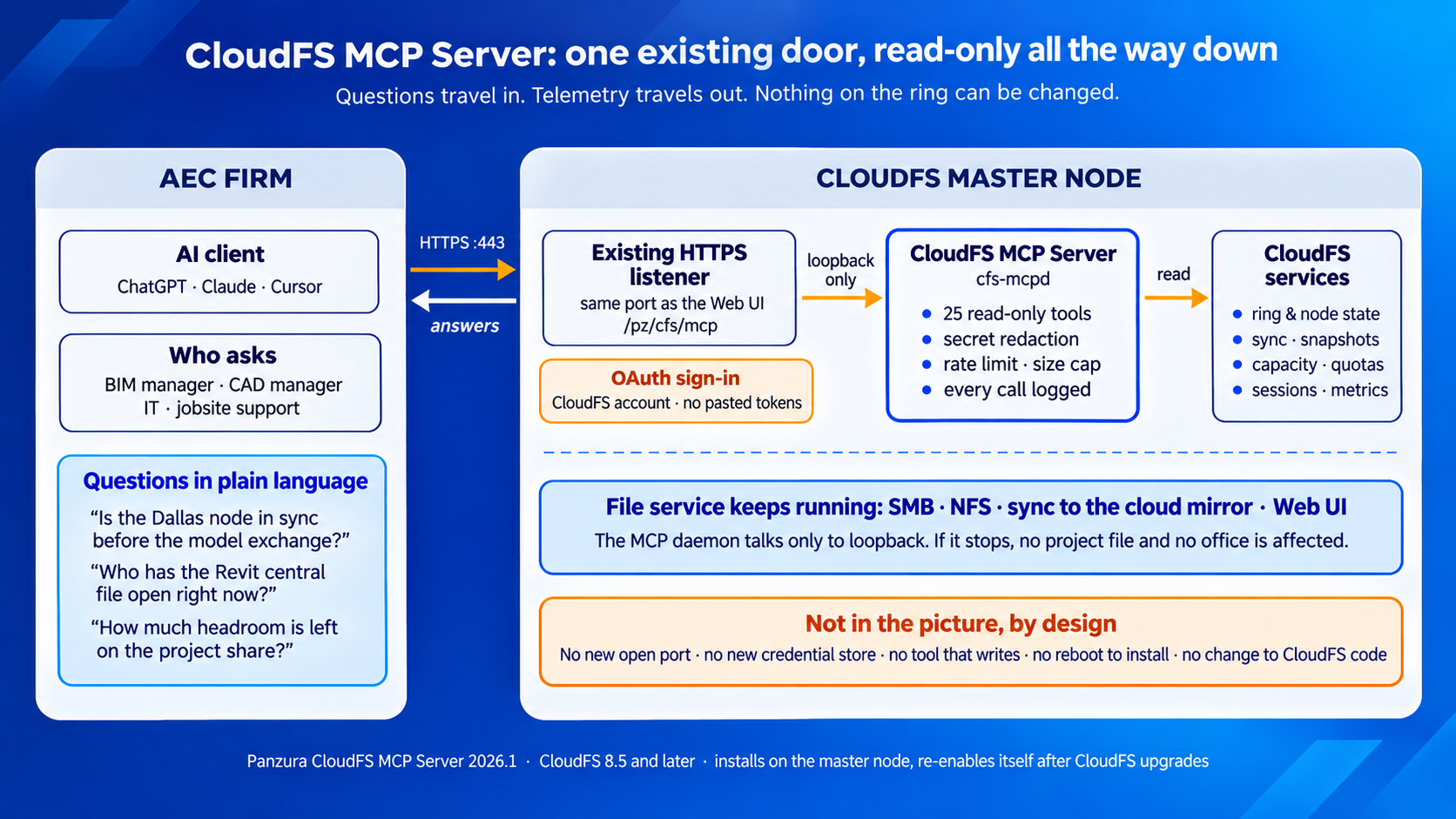
AEC organizations gain faster operational insight without weakening security, access policy, or accountability across offices, partners, and job sites. That helps reduce exposure to data loss, unauthorized access, audit gaps, and project delays while preserving the controls required for client and contractual information.
This matters for firms managing client data under ISO 19650 document-control regimes or ITAR- or CMMC-adjacent contracts. The MCP layer adds observability without widening the attack surface, because it terminates on the node’s existing TLS listener and inherits the cluster’s existing authentication, rather than introducing a separate credential store of its own.
The MCP Server has a minimal deployment footprint and does not interrupt active workloads. Firms can introduce AI-assisted operations without sacrificing utilization across time zones or adding downtime to live construction schedules.
Organizations running CloudFS 8.5.0.0 or later can deploy it directly on the master node without a reboot or additional inbound firewall ports. Supported MCP clients include ChatGPT, Claude Desktop, Claude Code, and Cursor.
Deployment is a standard FreeBSD package install on the master node (the package refuses to install elsewhere), enabled and started with two service commands:
No reboot is required. The installer reloads—never restarts—the existing web-server configuration to add the MCP location, and the endpoint reuses the node’s existing HTTPS port. Workloads keep running throughout. The package also survives CloudFS upgrades on its own: it keeps a copy of itself in persistent storage and a boot-restore hook reinstalls it after a CloudFS upgrade, so the endpoint returns to its enabled state without an administrator re-doing the work. Configuration is likewise preserved across upgrades and is never overwritten by one.
A handful of tools depend on CloudFS features introduced after 8.5, and the server reports this honestly rather than failing cryptically. A tool that needs a newer CloudFS release returns a clear "not available on this release" answer instead of an error. Organizations running CloudFS 8.5.0.0 or later can deploy the server itself. Confirm with Panzura support which tools require a newer CloudFS release on your ring before promising the full catalog to stakeholders.
Note also that the endpoint runs on the master node, and after an HA failover the active master changes—point MCP clients at the ring’s HA VIP or DNS alias rather than a specific node name so they follow the role.
By shortening the path from issue to evidence, CloudFS MCP Server can accelerate triage and root-cause analysis when slow access, synchronization anomalies, capacity pressure, or unexpected file activity threaten delivery. Earlier detection and faster resolution help limit idle time, avoid escalation costs, protect milestone dates, and reduce the downstream expense of rework.
Two design choices make it safe to leave this on in production: share-size measurement runs detached at the lowest CPU priority and pauses whenever the node gets busy, and ring-wide health checks are throttled so their load does not scale with ring size. The observability layer does not compete with the file services it observes.
AEC AI strategies often focus on drawings, models, specifications, and project records. Panzura extends AI to the operational foundation that keeps those assets available and governed.
Panzura Nexus brings project files into AI ecosystems for discovery and knowledge retrieval. CloudFS MCP Server adds operational intelligence into the health and behavior of the platform serving those files. Together, they enable firms to extract more value from existing project data and infrastructure while reducing the cost and risk of finding, governing, and supporting information across design, construction, and closeout.
The two are complementary rather than overlapping: Panzura Nexus answers "what does this project contain?" while the MCP Server answers "is the platform that holds it healthy?" One grounds AI in project content, the other in operational evidence.
Panzura CloudFS MCP Server 2026.1 is available now for CloudFS 8.5 and later. It gives AEC firms a secure, read-only foundation for conversational operations, helping preserve billable productivity, reduce operational overhead, protect project continuity, and improve delivery confidence.
Protect productivity. Reduce risk. Strengthen project margins.
If you are running CloudFS 8.5 or later, you can try CloudFS MCP Server today with the AI client your teams already use. Talk to a Panzura expert about enabling the endpoint on your master node.
Frequently Asked Questions (FAQs)
Panzura CloudFS MCP Server 2026.1 is a read-only Model Context Protocol (MCP) endpoint that runs on the CloudFS master node and connects live CloudFS operational data to AI clients such as ChatGPT, Claude, and Cursor. It exposes 25 read-only tools covering ring and node health, synchronization, capacity, quotas, shares, snapshots, SMB sessions, audit events, configuration, and performance history. CloudFS administrators ask questions in plain language and receive answers grounded in current platform telemetry. It is generally available now for CloudFS 8.5 and later, and it is installed as a single package on the master node.
Panzura CloudFS MCP Server 2026.1 installs on a CloudFS master node running CloudFS 8.5 or later. The package checks that it is being installed on the master and refuses to install elsewhere. A few of the 25 tools depend on CloudFS features introduced after 8.5; on an older ring those tools return a clear “not available on this release” response rather than an error. If you want the full tool catalog, check with Panzura support which tools require a newer CloudFS release before you roll it out. Because the endpoint runs on the master, point AI clients at the ring’s HA VIP or DNS alias so they follow the role after a failover.
Panzura CloudFS MCP Server supports MCP clients including ChatGPT, Claude Desktop, Claude Code, and Cursor. Any client that implements the Model Context Protocol with OAuth sign-in can connect. The client registers itself with the endpoint, opens a browser window, and the user signs in with a CloudFS account; no API token is pasted into a client configuration file. Once connected, the client discovers the 25 read-only tools automatically and calls them in response to natural-language questions. Administrators can withhold individual tools by name for a given cluster, so the client sees only the tools the site has chosen to expose.
No. Every one of the 25 tools in Panzura CloudFS MCP Server 2026.1 is read-only, and there is no configuration setting that enables a tool that writes. The server cannot create, modify, or delete files, change configuration, release a file lock, block or unblock a user, or alter snapshot and quota policies. It reads operational state and reports it. When an AI client asks for something outside that scope, the tools are written to say the information was not retrieved rather than infer or guess. Actions such as releasing a lock or changing a quota remain with an administrator in the CloudFS Web UI.
Panzura CloudFS MCP Server returns only a reviewed subset of CloudFS configuration. Passwords, password hashes, license tokens, and cloud access keys are excluded and cannot be requested through any tool. Audit payloads pass through a second redaction layer that masks credential-like fields before the AI client sees them. Access requires signing in with a CloudFS account over OAuth, each identity is rate-limited to 60 tool calls per minute by default, every tool result is capped in size, and every call is logged on the node. The endpoint is served through the node’s existing HTTPS listener, and the daemon listens only on loopback, so no new network surface is created.
No. Panzura CloudFS MCP Server installs as a standard package on the CloudFS master node with two commands: one to install the package and one to enable and start the service. The installer adds a single include line to the node’s existing web server configuration and reloads it rather than restarting it, and the endpoint reuses the node’s existing HTTPS port, so no new inbound firewall rules are needed. File services, synchronization, and the Web UI keep running throughout. The package keeps a copy of itself in persistent storage and re-enables itself after a CloudFS upgrade, so administrators do not repeat the installation.
Panzura CloudFS MCP Server answers the infrastructure questions that typically stall AEC project teams. It can report whether each office’s node is healthy and synchronized with the cloud mirror before a model exchange, which workstations currently hold files open or locked on a project share, how much capacity and quota headroom remains before an upload fails, which scheduled snapshots exist for a project volume and what retention they carry, and how SMB latency and throughput have trended on a jobsite node. It can also show which user accounts CloudFS has blocked and what configuration changes were made through the management API, by whom, and when.

Unmesh Rathi is Vice President of Technology at Panzura, where he drives technical direction and leads the architecture team. Unmesh brings more than two decades of enterprise storage engineering experience spanning file systems, data management, and high-performance storage architectures. He holds multiple patents and has held senior roles at Pavilion Data ...
Unmesh Rathi: Nov 1, 2026
CloudFS MCP Server 2026.1 Connects Live CloudFS Telemetry to the AI Clients AEC Teams Already Use So Questions About Project Files, Sync, and...

 David Barley: Oct 28, 2026
How Panzura Nexus Holds Microsoft 365 Copilot and AI Agents to Your File Permissions, and How Panzura Symphony and CloudFS Shrink What Those...

 Mike Harvey: Oct 22, 2026
Why Agentic AI Puts Unstructured File Data at the Center of Storage Strategy, and What to Ask of a File Platform