Autodesk Vault for the Design Record, Panzura CloudFS for Everything Else
 Darrin Chapman: Nov 9, 2026
Why Engineering Firms Run Autodesk Vault and Panzura CloudFS Side by Side, and the Role of Each Solution in the AEC Stack


Panzura
Our enterprise data success framework allows enterprises to build extraordinary hybrid cloud file and data systems.

Platforms
Complementary file and data platforms that deliver complete visibility, control, resilience, and immediacy to organizations worldwide.

Solutions
From data resilience to global file delivery, we solve the toughest and most important data problems facing organizations globally.

Resources
Find insights, news, whitepapers, webinars, and solutions in our resource center.

Company
We bring command and control, resiliency, and immediacy to the world’s unstructured data. We make it visible, safeguard it against damage, and deliver it instantly to people, workloads, and processes, no matter where they are.
13 min read


Table of Contents
Why Engineering Firms Run Autodesk Vault and Panzura CloudFS Side by Side, and the Role of Each Solution in the AEC Stack
Key Takeaways
Autodesk Vault answers the questions engineering teams depend on. Which version is current. Which revision is released. Who approved the change, and where a given part is used. It does that for the design files your teams check in from Inventor, AutoCAD, Civil 3D, and the rest of the Autodesk lineup.
Around every Vault sits a much larger body of files that were never meant to go into it. Simulation results. Point clouds and scans. CNC programs. Test and quality data. Supplier files, quotes, contracts, renderings, and years of finished projects. Those files live on file servers at each site, they are slow to reach from anywhere else, and they are usually the least protected data in the company.
Panzura CloudFS is the file platform for all of it. One live set of files for every site, open at local speed, locked in real time, and built so what has been stored can never be overwritten, which means an attack can be rolled back rather than simply recovered from. Vault keeps doing its job. CloudFS takes care of everything around it.
People sometimes ask whether they need both. Neither can stand in for the other. Here is how they fit.
Two systems, two jobs
Vault is a product data management (PDM) application. It manages what a design file means. That includes its version, revision, lifecycle state, what it references, and where it is used. A Vault check-out reserves a design for one engineer, sometimes for days, and that reservation is recorded in the Vault database. That is how a team knows which drawing is approved for manufacturing and who signed off on the change.
Panzura CloudFS is a hybrid cloud file platform. It manages where every file lives: one live data set across all sites, fast to open, locked correctly while someone has it open, and recoverable to a chosen point in time. It presents ordinary Windows file shares, so nothing is installed in Vault or in your CAD tools.
Table 1. Autodesk Vault and Panzura CloudFS: Better Together
Confusion could stem from shared vocabulary. Both products talk about a single source of truth, versions, locking, and multi-site work. The words match, but the meanings do not. A Vault version is an engineering record with history and release status. A CloudFS snapshot is a read-only recovery point. A Vault lock is a check-out. A CloudFS lock is held while an application has the file open, enforced across every site in real time.
CloudFS has no revisions, approvals, or bills of materials. Vault is not a company file server. A firm that needs change management needs Vault. A firm with file servers at more than one site needs a file platform so they need CloudFS. Most engineering firms are both.
What sits outside your Vault
Ask any Vault administrator what is kept out of the Vault on purpose, and the list is long. Simulation results are huge and regenerated often. Point clouds, the raw output of laser-scanning a site or building, can reach 100 GB. Autodesk added excluded paths at check-in to Vault 2021.1 for data of exactly this kind. CAM and CNC programs are often owned by the shop floor, in tools that are not Autodesk’s. Test and inspection data comes off instruments. Supplier files arrive in whatever format the supplier uses. Quotes, contracts, and project documents are business records, not design data. Add the legacy projects that predate the Vault, the work from other design tools, and, in many AEC firms, the Revit models that live on shares or in Autodesk’s cloud rather than in Vault.
For many firms, that list is the larger one, and it grows faster. It also tends to sit on the oldest hardware in the building, with each site keeping its own set because the files are too big to move across the WAN.
One more item belong to the list, namely the Vault’s own backup sets. The Vault server console backs up the SQL database and the file store together, and that backup has to be written somewhere. It is ordinary file data, and it is only useful if it survives the event that took the Vault down.
What CloudFS adds to the equation
Every site often needs the same files at the same moment. Many file platforms promise one source of truth across sites and deliver it on a delay. Changes go up to a central hub on a schedule, then down to the other sites on another, so a save at one office reaches the next one minutes later. For office documents that is an inconvenience. For a 60 GB scan or a simulation set that two plants are both working from, it is how one site ends up overwriting the other, and there is no Vault check-out on those files to prevent it. Panzura CloudFS nodes update each other directly, peer to peer across a full mesh. A change saved at one site is what the next site opens, and there is no question about which one is current.
Image 1. Vault keeps the design record. CloudFS carries everything around it.
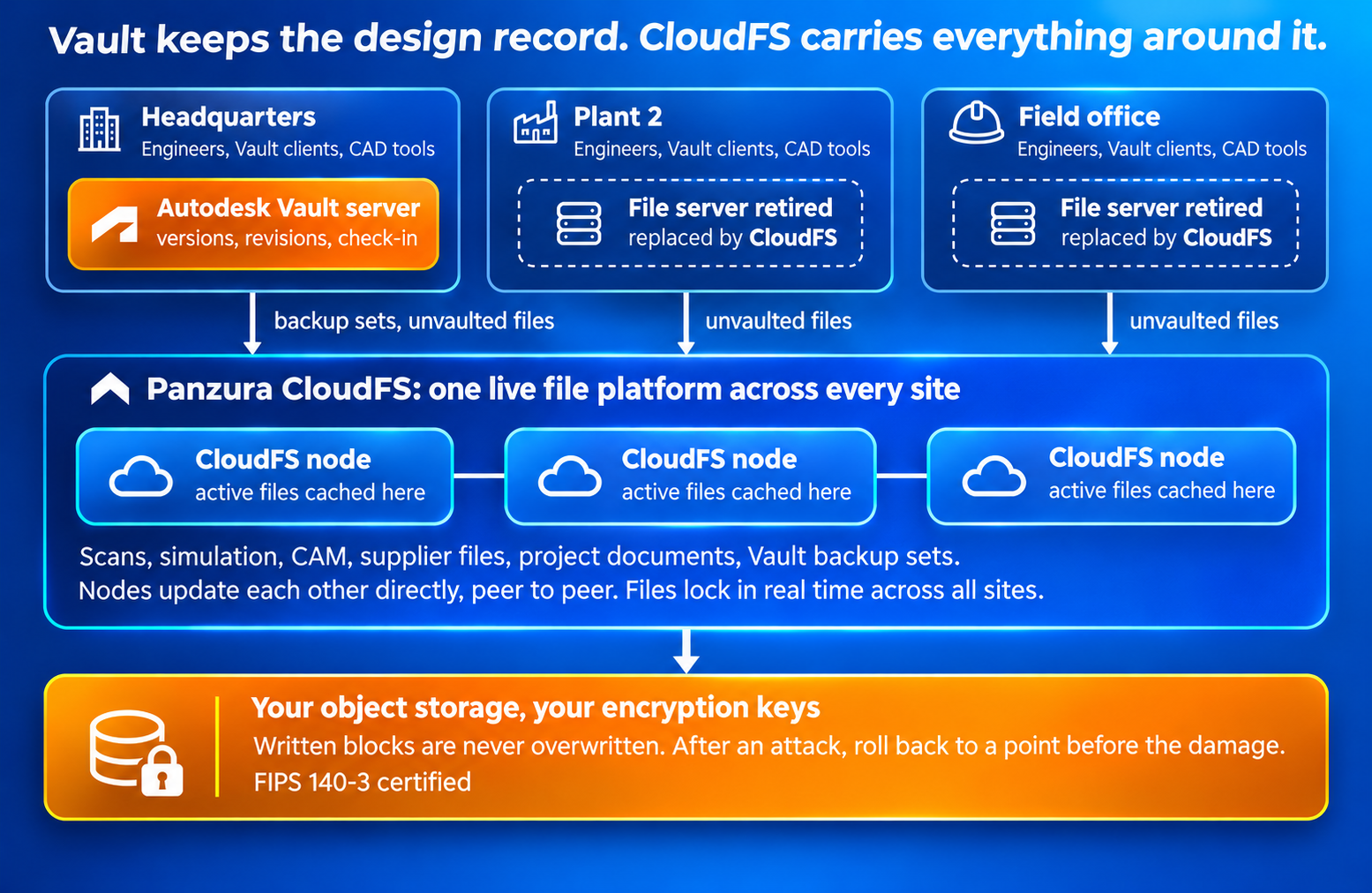
CloudFS writes changed data to object storage every 60 seconds as new immutable blocks, and it never overwrites a block once written. An attacker who encrypts files is writing new blocks, so the live view of those files is damaged, but every earlier block is still there and cannot be altered or deleted, whether the actor is ransomware, a malicious insider, or an honest mistake. Recovery means rolling the file platform back to a chosen moment in time before the damage took place, which takes minutes because nothing is restored from a separate archive. The question any executive should ask is, if this happens, how much work does the company redo?
An Autodesk partner’s write-up from May 2025 describes one Vault customer whose production Vault and online backup were both encrypted in the same attack, and another who lost four days of work. Vault replication does not help here. It keeps a second set of vaulted files at another site, but it replicates corruption and encryption along with everything else and cannot return a Vault to an earlier state.
Backup sets written to a CloudFS share become immutable in cloud object storage when it is uploaded, away from the Vault server and beyond the reach of anything running on your network. You keep using Vault’s own backup tools and simply point them at a CloudFS destination.
Table 2. Common AEC use cases for Vault and CloudFS together
What this looks like in an AEC firm
Take a civil and infrastructure firm with offices in three cities. The civil engineers run Vault Professional for their Civil 3D and AutoCAD drawings, with revisions and lifecycle states tracked the way the QA manager wants them. The survey crew brings back point-cloud scans of a highway corridor at 60 to 100 GB a project, and nobody wants those in the Vault.
Before CloudFS, each office kept its own set of scans on a local NAS, and an engineer in the second office who needed a scan from the first waited for someone to copy it overnight. On CloudFS, the scan sits on one file platform, cached at the office that uses it most, and opens at local speed from any of the three. Vault keeps managing the drawings. The firm stops managing three sets of scans.
Or take a multidisciplinary design firm where the architects work in Revit across offices while the mechanical team uses Inventor and Vault for equipment design. The Revit models have never been in Vault, instead sitting on shares. Two offices working in the same model is where sync-based platforms have an admitted limit. Some vendors state in their own documentation that multi-site collaboration is not supported, and others warn that performance may suffer once more than a handful of people are in the same model.
CloudFS supports byte-range locking for applications built to use it, Revit among them, so several people work in different parts of the same model at once, from different offices. AFRY runs roughly 18,000 engineers across about 100 offices this way, with real-time collaboration on large Revit files and no cross-site version conflicts.
Another case is a firm with federal work and CMMC obligations. Vault supplies role-based access and lifecycle security for design records. The larger problem is the rest of the file estate, such as project documents, supplier files, and survey data spread across site servers with inconsistent permissions and no audit trail.
Mead & Hunt put CloudFS across more than 40 offices, ended file-locking conflicts on shared CAD files, and uses the centralized controls and audit record to support CMMC compliance. Vault answers for the design records. CloudFS answers for everything else, with the customer holding the storage and the keys.
What changes and what doesn't
Your Vault server, database, and file store stay exactly as they are. So do your Vault licenses, workflows, and permissions, the way engineers check files in and out, your CAD tools and add-ins, and the local working folders most engineers use. If you run Vault Professional across several locations, Vault keeps handling replication of your checked-in design files. CloudFS runs alongside your existing storage during migration, so teams keep working while data moves, and Vault is not part of that migration at all.
Getting there is where Panzura Symphony earns its place. Before anything moves, most firms cannot say what is on their site servers such as how much is active project work, how much is completed projects nobody has opened in years, and how much is duplicated across offices. Panzura Symphony gives visibility into the file estate, including the NAS and file servers CloudFS will replace, and then orchestrates the data movement into CloudFS and the tiering of cold data to the right place. It is a separate, infrastructure-agnostic product, so it works against the storage you have today as well as against CloudFS. For a firm with a decade of closed projects on aging hardware, that is the difference between a migration that is planned and one that is guessed.
Autodesk is bringing an AI assistant into Vault to search and act on Vault data. That is the right place for questions about released designs. Much of what a firm knows is outside the Vault.
Panzura Nexus makes CloudFS file data askable in Microsoft 365 Copilot. It runs on the CloudFS estate already deployed, so there is no second copy of the data to build and index. Each person’s file permissions carry through to every answer, which means an engineer asking Copilot about a project gets answers only from files they are allowed to open.
Panzura Nexus is event-driven, so a changed file or a revoked permission is reflected as it happens rather than at the next scheduled crawl. The two assistants do different jobs, in the same way the two products do. One answers from the engineering record, the other from everything around it.
A Vault administrator and an IT director can answer the following in an afternoon. If you say yes to three or more, the file estate around your Vault is the problem, and it is a solvable one. Here are the questions to ask:
If most of those answers were yes, the fix does not touch your Vault. Vault keeps managing the design record exactly as it does today. CloudFS takes over the file servers around it: one live set of files at every site, backups an attacker cannot reach, and a rollback measured in minutes instead of a restore measured in days.
The fastest way to test that claim is to run CloudFS on your own file types across two of your sites, with your Vault left exactly as it is, then talk to a Panzura expert.
Vault tells you which design is the right one. Panzura CloudFS makes sure every file is there, current, and recoverable at every site. You need both, and you can have both without changing either.
Autodesk, Vault, Inventor, AutoCAD, Civil 3D, Revit, and Fusion are trademarks of Autodesk, Inc. Panzura CloudFS is an independent product. It is not an Autodesk product or add-in, and Panzura is not affiliated with, endorsed by, or sponsored by Autodesk.
Frequently Asked Questions (FAQs)
Autodesk Vault is a product data management (PDM) application that manages what a design file means: its version, revision, lifecycle state, approvals, and where it is used. Panzura CloudFS is a hybrid cloud file platform that manages where every file lives, keeping one live data set across all sites with local-speed access, real-time locking, and recovery to a chosen point in time. Vault holds the design files checked in from Autodesk tools and is licensed per user. CloudFS holds every file the firm has, in any format, and is licensed by capacity. Neither replaces the other. A firm that needs change management needs Vault. A firm with file servers at more than one site needs a file platform.
No. Autodesk Vault is a PDM system, not a company file server. It has no mechanism for serving the simulation results, point clouds, CNC programs, test data, supplier files, quotes, contracts, and legacy projects that sit outside it, and Autodesk added excluded paths at check-in in Vault 2021.1 so that large data of exactly this kind stays out. For most engineering firms, the files outside the Vault are the larger set and the faster growing. Panzura CloudFS presents those files as ordinary Windows shares at every site, so nothing changes in Vault, in your CAD tools, or in the way engineers check files in and out.
Point clouds and scans, which can reach 100 GB a project. Simulation and analysis results, which are regenerated too often to put under revision control. CAM and CNC programs, often owned by the shop floor in tools that are not Autodesk’s. Test and inspection data from instruments. Supplier files in whatever format the supplier uses. Quotes, contracts, renderings, and project documents, which are business records rather than design data. Legacy projects that predate the Vault, work from other design tools, and in many AEC firms the Revit models that live on shares. Then the Vault’s own backup sets, which are ordinary file data and need a home that survives an attack.
Autodesk Vault locking is a check-out: an engineer reserves a design file, sometimes for days, and the reservation is recorded in the Vault database. Panzura CloudFS locking is held while an application has a file open, and it is enforced across every site in real time, so two offices cannot save over each other on files that Vault does not protect. For applications built to use byte-range locking, Revit among them, CloudFS lets several people work in different parts of the same model at once from different offices. The two mechanisms address different files. Vault protects the design record. CloudFS protects everything around it.
Panzura CloudFS writes changed data to object storage every 60 seconds as new immutable blocks and never overwrites a block once written. An attacker who encrypts files is writing new blocks, so the live view is damaged, but every earlier block is still there and cannot be altered or deleted. Recovery means rolling the file system back to a chosen moment before the damage, which takes minutes because nothing is restored from a separate archive. Autodesk Vault replication does not provide this: it keeps a second set of vaulted files at another site, but it replicates corruption along with everything else and cannot return a Vault to an earlier state.
Point Autodesk Vault’s own backup tool at a Panzura CloudFS share. The Vault server console backs up the SQL database and file store together, and that backup has to be written somewhere. On CloudFS it becomes immutable in cloud object storage once uploaded, away from the Vault server and beyond the reach of anything running on your network. In a Sophos survey of 2,974 organizations hit by ransomware, 94 percent said attackers tried to compromise their backups, and median recovery costs were eight times higher when they succeeded. A Vault backup is only useful if it survives the event that took the Vault down.
Nothing. Your Autodesk Vault server, database, file store, licenses, workflows, and permissions stay as they are, along with your CAD tools, add-ins, and the local working folders most engineers use. If you run Vault Professional across several locations, Vault keeps handling replication of checked-in design files. Panzura CloudFS runs alongside existing storage during migration, so teams keep working while data moves, and Vault is not part of that migration. The fastest way to test this is to run CloudFS on your own file types across two sites with your Vault left exactly as it is.

Darrin Chapman is Senior Director of Product Marketing. With nearly 30 years of experience spanning Dell/EMC, Cohesity, and NetApp, Chapman articulates Panzura’s value proposition to the marketplace.
Darrin Chapman: Nov 9, 2026
Why Engineering Firms Run Autodesk Vault and Panzura CloudFS Side by Side, and the Role of Each Solution in the AEC Stack

 Unmesh Rathi: Nov 1, 2026
CloudFS MCP Server 2026.1 Connects Live CloudFS Telemetry to the AI Clients AEC Teams Already Use So Questions About Project Files, Sync, and...

 David Barley: Oct 28, 2026
How Panzura Nexus Holds Microsoft 365 Copilot and AI Agents to Your File Permissions, and How Panzura Symphony and CloudFS Shrink What Those...