Skip to the main content.
Panzura-Icon-FullColor-RGB@0.75x

Panzura

Our enterprise data success framework allows enterprises to build extraordinary hybrid cloud file and data systems.

architecture-icon

Platforms

Complementary file and data platforms that deliver complete visibility, control, resilience, and immediacy to organizations worldwide.

Layer_1-1

Resources

Find insights, news, whitepapers, webinars, and solutions in our resource center.

Layer_1-2

Company

We bring command and control, resiliency, and immediacy to the world’s unstructured data. We make it visible, safeguard it against damage, and deliver it instantly to people, workloads, and processes, no matter where they are.


Panzura CloudFS MCP Server

Ask your file estate a question. Get an answer from the estate itself.

CloudFS MCP Server connects ChatGPT, Claude, and Cursor to live CloudFS telemetry. Ask in plain language whether a site is healthy, which node is behind on sync, how much quota a share has left, or who deleted a folder and when. The answer comes from the platform, and the platform cannot be changed from the chat. Read-only, all the way down.

25 read-only tools · OAuth sign-in with your CloudFS account · No new network surface · Every call logged · Available for CloudFS 8.5 and later

Triumphant Businessman in Spiraling Energy
What it answers

The questions that used to take multiple consoles and a log search.

Most operational questions about a distributed file estate are simple to ask and slow to answer, because the evidence is spread across health dashboards, sync status, capacity reports, session lists, and audit logs. CloudFS MCP Server turns each question into a bounded query against the live CloudFS services that hold the answer, and returns it in one conversation.

pan-blog-cam-3-feature

Is every site healthy and current?

Is every site healthy and current? A linked file opens at one office and fails at another. A ring health check returns each node’s individual result, so “which site is behind?” becomes a per-node status list instead of a conference call.

pan-blog-mcp-1-feature

Will this share run out of room before the job finishes?

A render queue, a nightly data load, or a model exchange is about to push a share past its quota. The server reports current usage, the quota policy in force, and the headroom left, before the upload fails rather than after.

pan-mcp-2

Is the slowness at this site or everywhere?

A branch reports slow file opens. Per-node SMB metadata timing and read/write throughput over the last several minutes show whether the problem is local to one node or ring-wide, and which workstations are holding files open on the share.

pan-mcp-3

Who deleted that folder and can we get it back?

An audit request or a missing project directory. The audit trail answers who, from which machine, and when, searchable by operation, node, or free text, and the snapshot list shows which scheduled snapshot still holds that version. An afternoon of console archaeology becomes a two-minute exchange.

The Tool Catalog

25 read-only tools, five groups, one coversation.

Answers arrive in seconds. Health checks take about a minute per node, so the server runs them in the background and serves the most recent result, marked fresh or stale. Long-running operations such as share-size measurement are cached and refreshed rather than recomputed on every question, and every tool response is capped in size so a broad question cannot produce an unbounded answer. Administrators can withhold individual tools by name for a given cluster, so a client sees only

Group
Tools
What it tells you
Node and ring health
cloudfs_ring_health_check, cloudfs_node_health_check, cloudfs_ring_status, cloudfs_ring_hosts, cloudfs_filer_availability
Whether each node is up and healthy, and which one is behind
Synchronization and data protection
cloudfs_master_sync_status, cloudfs_list_snapshots
Which nodes are behind on sync, and which scheduled snapshots exist for a share and what retention they carry
Capacity and quotas
cloudfs_quota_capacity, cloudfs_list_quota_policies, cloudfs_node_capacity, cloudfs_datastore_info, cloudfs_disk_list
How close a share is to its quota, and how much headroom remains on the node and in the datastore
File services and access
cloudfs_list_smb_shares, cloudfs_smb_share_stats, cloudfs_smb_sessions, cloudfs_smb_users, cloudfs_blocked_users, cloudfs_interdiction_status, cloudfs_list_nfs_exports
Which shares and exports exist, which workstations are connected and holding files open, and which accounts CloudFS has blocked
Audit and performance
cloudfs_audit_operations, cloudfs_audit_trail, cloudfs_system_config, cloudfs_list_stats_series, cloudfs_get_stats, cloudfs_whoami
Who changed or deleted what, from where, and when; what configuration changes were made through the management API; and how SMB latency and throughput have trended per node

← Swipe to see more →

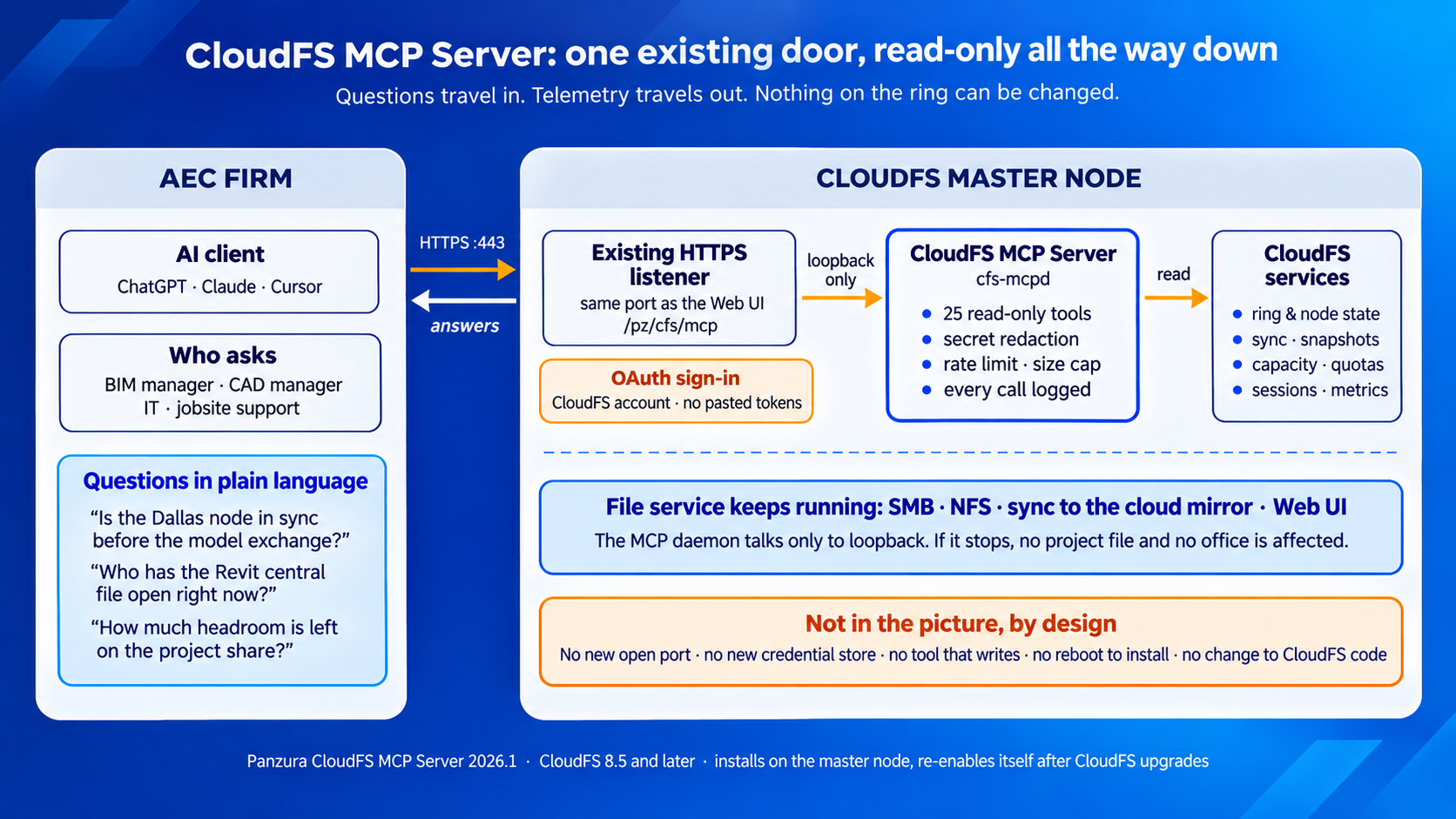
CloudFS MCP Server Infographic
One existing door, read-only all the way down

AI access to production infrastructure, without widening the attack surface.

Connecting an AI client to a production file platform raises an obvious question: what can it reach, and what can it do once it gets there? Each answer below has a mechanism behind it, not a policy statement.

  • Read-only, enforced in code. A fixed allowlist of read-only endpoints; nothing writes.

  • Your CloudFS identity. OAuth sign-in with your own account; existing roles decide what you see.

  • No new network surface. Existing HTTPS listener, loopback only, no new firewall rules.

  • Redaction fails closed. Secrets never leave; an unverifiable response is refused.

  • Every call audited. Logged with the identity behind it.

  • Abuse bounded. Rate limits, size caps, per-site control over which tools are exposed.

  • No guessing. Out of scope means “not retrieved,” never an inferred answer.

For organizations operating under document-control, defense, or regulated-data regimes, this is the point: the MCP layer adds observability while inheriting the cluster’s existing authentication and TLS termination, rather than introducing a credential store of its own.

CloudFS MCP Server & Panzura Nexus

One answers what your files contain. The other answers whether the platform holding them is healthy.

Panzura Nexus brings the contents of your file estate into Microsoft 365 Copilot and AI agents, with the permissions already set in CloudFS enforced on every request. CloudFS MCP Server brings the operational state of the platform serving those files into the same kind of conversation. The two are complementary rather than overlapping: one grounds AI in content, the other in operational evidence, and together they let an organization get more from the file data and the infrastructure it already runs.

ChatGPT Image Jun 12, 2026, 02_26_22 PM
Deployment

Two commands on the master node. No reboot, no downtime, no re-doing it after upgrades.

CloudFS MCP Server installs as a standard package on the CloudFS master node and refuses to install anywhere else.

  • Web server reloads, never restarts; file services and the Web UI keep running

  • Reuses the existing HTTPS port; no new inbound firewall ports

  • Reinstalls itself after a CloudFS upgrade; configuration preserved

  • Share-size measurement runs at lowest priority and pauses when the node is busy

  • Health checks throttled so load does not grow with ring size

  • After an HA failover, clients follow the master if pointed at the HA VIP or DNS alias

Requirements. CloudFS 8.5.0.0 or later. A few of the 25 tools depend on CloudFS features introduced after 8.5; on an older ring those tools return a clear “not available on this release” response rather than an error. Check with Panzura support which tools require a newer release before committing to the full catalog.

Supported clients. ChatGPT, Claude Desktop, Claude Code, and Cursor. Any client that implements the Model Context Protocol with OAuth sign-in can connect; once connected, it discovers the tools automatically.