



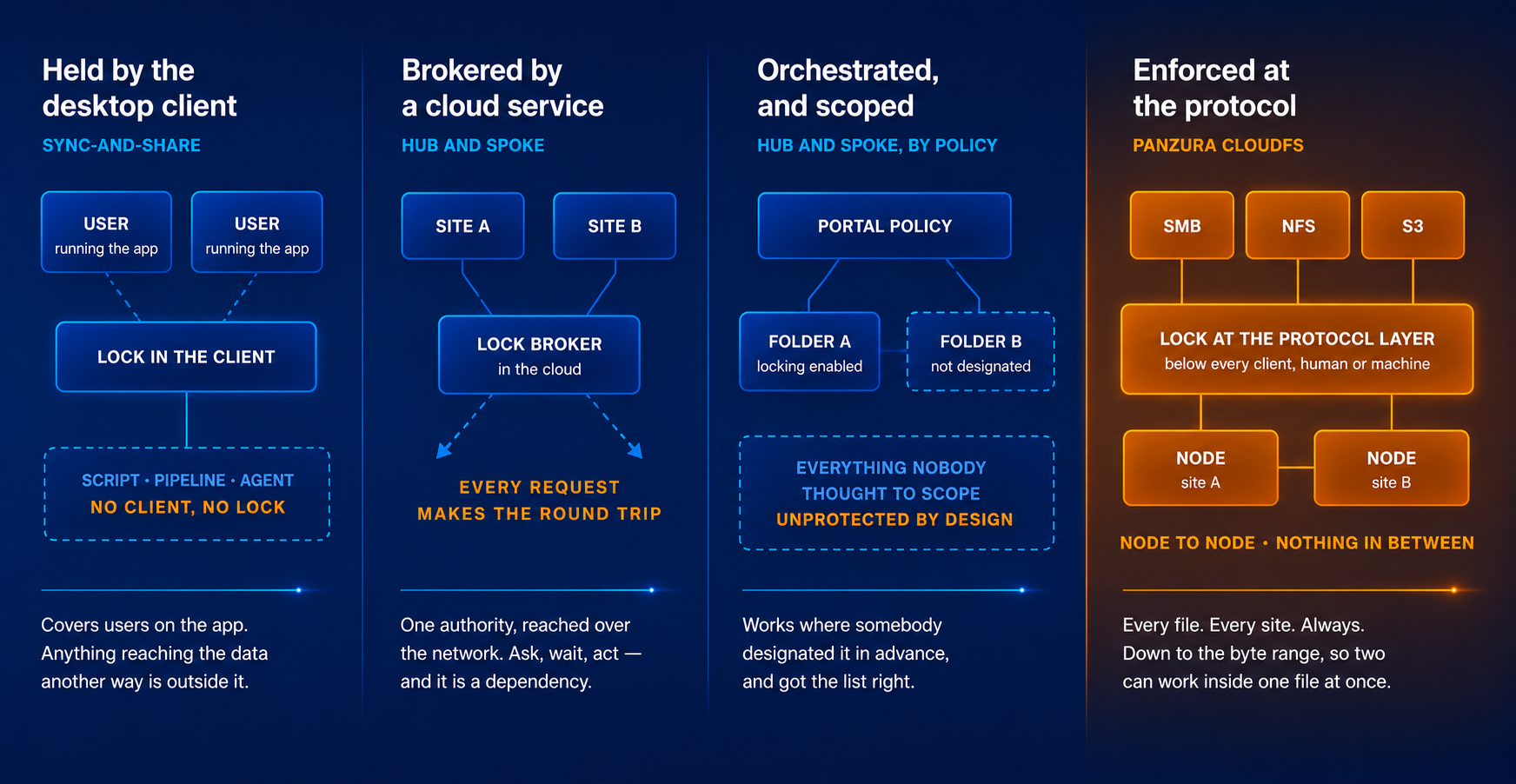

A lock held by a desktop agent covers people running that agent — a script, a render job or a pipeline reaching the same file is outside it. A lock brokered through a cloud service or portal is broader, but every open makes a round trip to ask permission, and every site depends on that component staying up. Both work. Both put something between your engineer and the file, and it is what you inherit for the life of the platform.
- Enforced at the protocol layer, so it governs any SMB, NFS or S3 client — including applications and processes that never run an agent
- Nodes coordinate peer to peer, with no broker to queue behind or lose
- A lock taken in Denver is visible in Dallas without a hub deciding

A lock is only useful if it reflects the file as it is right now. Where consistency is reached by propagation, another site can hold a version that is no longer current while the platform works to catch it up. Ask what a colleague in another office sees in the seconds after a save — and ask whether the answer costs extra, because multi-site collaboration is sold as a separately licensed add-on service elsewhere in this market. CloudFS offers:
- One authoritative data set, so no site is ever serving a version another has already superseded
- Locking is the architecture, not a tier — included in every deployment, nothing to enable or renew
- Capacity-based licensing, so the cost does not scale with headcount

Locking is often scoped — enabled per folder, triggered for specific file types, strict inside a site and selective across them. That is a defensible design when the people editing understand the scoping. It holds up less well once an automated process is traversing the estate, because an agent reaches far more of it than any person and knows nothing about which folders somebody designated. CloudFS provides:
- Every file, every site, always on — nothing to designate, and nothing an agent can wander into unprotected
- Byte-range locking, so two people can edit different regions of the same file at once
- Consistent behavior whether a user arrives over SMB, NFS or S3
Nodes talk to each other with nothing else in the middle.
CloudFS nodes coordinate directly in a full mesh. A lock taken anywhere is visible everywhere, with no hub arbitrating and no component every site depends on.
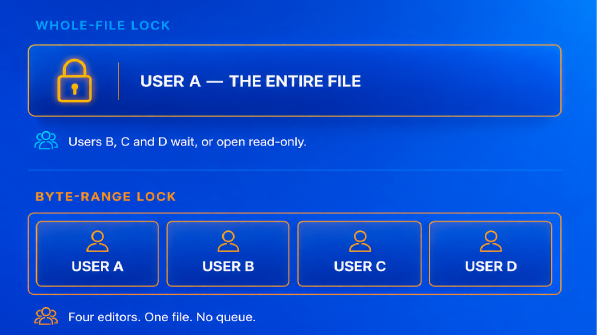
Lock the whole file and the second person waits. CloudFS locks the region being edited instead, so several people work inside one large file at the same time.
- Locks propagate node to node in real time, with no broker in the path
- Works in applications that support range locking, Microsoft Excel and Autodesk Revit among them
- Enforced identically across SMB, NFS and native S3
- A lock left by someone who went offline is released by your own team, not a support ticket
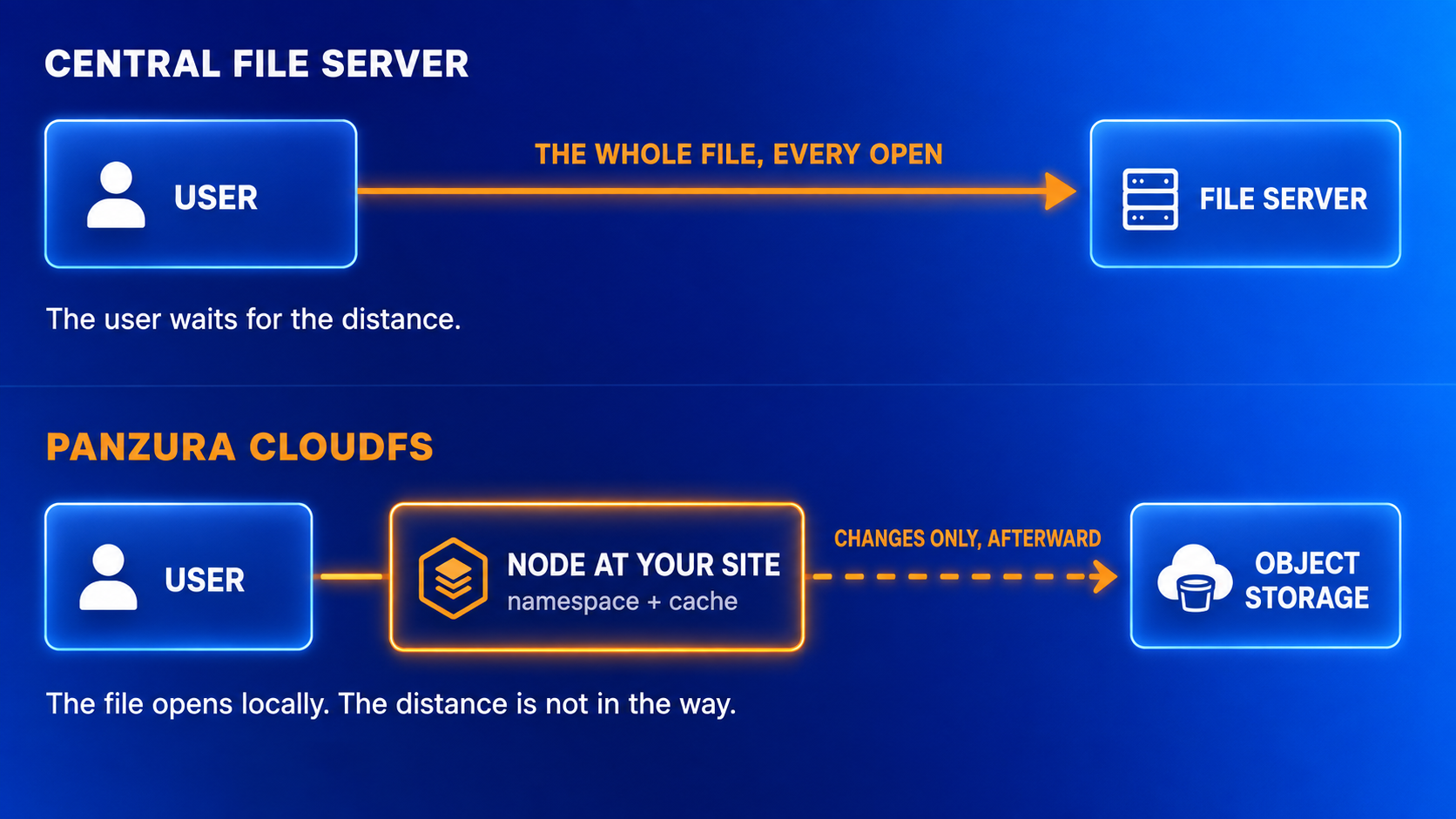
Collaboration only counts if the file opens. Every node holds the full global namespace in metadata, so users browse millions of files instantly, and the working set caches locally so a 2GB assembly behaves like a local file. Writes are acknowledged locally and committed behind the user.
- AEC customers report Revit models opening in seconds rather than 25 minutes
- Sites keep working through an outage and reconcile automatically
- Regional Store localizes data in regional buckets
Four things have to be true at once. Panzura covers all of them.
Collaboration is not one capability. The file has to be current, everyone who needs it has to be able to reach it, the right people have to have access and the wrong people must not, and somebody has to be able to reconstruct what happened when a version is disputed. Three of these come from the CloudFS platform. The fourth, Panzura Symphony, runs against the storage you have today, including estates you have not moved.

One authoritative data set with locking enforced at the protocol layer, down to the byte range, so several people work inside the same file at once and no site serves a version another has already superseded. Metadata is global and the working set caches locally, so it opens at local speed anywhere.

Consultants, subcontractors, joint-venture partners, field crews and anyone on a phone reach the same governed files without a VPN and without copies being sent out — across Windows, Mac, mobile and the browser, including deployments that have to run dark.

Panzura Symphony. Years of project folders accumulate permissions nobody has audited — teams blocked from files they need, and reaching files they should not. Symphony analyzes access control lists and remediates them automatically, across CloudFS and third-party estates, so a new studio or an acquired practice joins the work rather than filing tickets about it.
.png?width=1672&height=941&name=ChatGPT%20Image%20Jul%2020%2c%202026%2c%2003_50_33%20PM%20(6).png)
File activity audit shows who opened, changed or moved a file and when, across every location. Estate-wide search finds the version somebody is looking for. On a project where a drawing becomes a claim, that record is the difference between a conversation and a dispute.

Prove it on a single project before you commit to anything.
Collaboration is the easiest capability to prove before you commit, because the failure it removes is one your teams can describe from memory.

Pick the project where two offices are already stepping on each other, and run it on CloudFS with the same teams and the same models. The comparison is not a benchmark — it is whether the emails asking who has the file stop.
- Choose one live multi-office project
- Count the version conflicts in the last quarter as your baseline

Most expansion is not a new deployment. Adding sites to an existing namespace does not re-platform anything, and two of the three things that follow are probably not switched on yet.
- Add the new locations to the namespace — no migration, no second estate
- Turn on Panzura Edge for consultants, field teams and anyone outside the buildings
- Run Symphony against the permissions an acquisition arrived with

One location, and the same file system. Express bundles CloudFS with a local high-availability node pair, Panzura Data Services and Panzura Nexus. Adding a second office later is a license change rather than a migration — which is when this page becomes relevant to you.
- Talk to a Panzura partner
- Add locations later without re-platforming